Recent Posts

Related Posts Plugin for WordPress, Blogger...

Samsung Z smartphone will have Tizen OS

will begin selling a smartphone that runs on its Tizen operating system in the third quarter of this year, advancing the company's plans to reduce dependence on Google's Android software

Samsung Galaxy S5 to arrive in 2014

6 MP, 4640 x 3480 pixels, autofocus, LED flash Super AMOLED capacitive touchscreen, 16M colors Size1440 x 2560 pixels, 5.25 inches (~559 ppi pixel density) Super AMOLED capacitive touchscreen, .

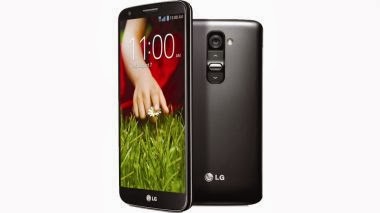
LG G2

With the G2, it seems like LG took a lot of cues from its Korean counterpart and built what many called a Galaxy S4 clone. It's large, made of lots of plastic, shaped similarly and is jam-packed with more features than a single person can handle.

This is default featured post 2 title

Go to Blogger edit html and find these sentences.Now replace these sentences with your own descriptions.

Showing posts with label HTC. Show all posts

Wednesday, June 18, 2014

Create Wireless Charging Trousers

Nokia Treasure Tag and MD-12 wireless speaker accessories for smartphones, Microsoft has unveiled a revolutionary new mobile accessory as prototype. Built in collaboration with acclaimed designer Adrien Sauvage, the accessory are a pair of trousers that supports wireless charging for Lumia handsets.
 Wireless Charging Trousers

The blog post also states how the Microsoft team and Sauvage incorporated the Nokia DC-50 wireless charging plate into the trousers. "The technology (known as inductive charging) comes from the new Nokia DC-50 wireless charging plate for Lumia smartphones. These smart trousers are the perfect way to keep your battery full and yourself in style," states the blog.


Microsoft said that the wireless charging trousers will be available for pre-order via Amazon soon. It however remains a question as to what actually powers the wireless charging plate. Sauvage's collaboration with Nokia is a part of the 'Modern Man' event set for July 11 at Toronto, Canada.

 Wireless Charging Trousers"We have a proud history of working within fashion, having previously collaborated with Bruce Weber and David Bailey, as well as recent partnerships at New York and London Fashion Week. Continuing this theme, we are excited to work alongside a talented designer such as A. Sauvage. As well as having the vision to co-create these amazing wireless charging trousers, his style complements the cutting-edge design of the new Lumia 930 smartphone perfectly," stated Adam Johnson, Marketing Director for Microsoft Mobile (UK and Ireland).

Nokia introduced its Treasure Tag and MD-12 wireless speaker accessories last month for the Indian market. Both the Nokia MD-12 portable wireless speaker and Treasure Tag pair with Nokia smartphones via Bluetooth or NFC.

Saturday, December 14, 2013

The Best Smartphones In The World

1. LG G2
 The Best Smartphones In The World


LG has trumped the competition with the G2. The phone offers a combination of value for money with high-end features which we haven't seen from rival flagship devices. A great specification combined with impressive design and handy software features mean there's very little to dislike about this handset - only really the lack of a microSD card slot.

2. Google Nexus 5
Google and LG have done a fantastic job with the Nexus 5, producing a very desirable phone at an outrageously low price. It's the best value-for-money smartphone out there right now.

3. Sony Xperia Z1
Sony has upgraded its fantastic Xperia Z. The Xperia Z1 feels nicer but is unfortunately bigger and heavier. It's a powerhouse with an all-round impressive specification. Easily one of the best Android handsets around but the high price tag taints this slightly.

4. iPhone 5S
If you already own an iPhone 5, it’s hard to justify upgrading to the 5S. Yes, it’s considerably faster and takes better photos and videos in low light, but the 5 is still a great smartphone and has at least another year in it before apps (and possibly iOS 8) start to find the A6 processor’s limits. Those with a 4S (or 4) are in for a treat, though. As well as serious performance gains, the bigger screen and lighter weight make a huge difference, and the fingerprint scanner is a bonus. Ultimately, if you want an iPhone, the 5S won’t disappoint and is one of the most future-proof of the current smartphone crop.

5. Motorola Moto G
Motorola's Moto G is the best budget smartphone around. At £135 it's got great build quality, an excellent screen, decent cameras and Android 4.3 Jelly Bean soon to be upgrade to 4.4 KitKat. It's only limited in the storage department and a lack of 4G support.

6. HTC One
The HTC One is up there with the very best smartphones on the market today. It has superb performance, and excellent build quality spoiled only slightly by running hot in use. You can't fault the feature set, and it matches the other high-end products in terms of price. In terms of audio and visual output it is unsurpassed. The interface might be an acquired taste for some, and we weren't overly impressed with the camera. It's not perfect, but alongside the Xperia Z and iPhone 5 this is about as good a phone as you can buy.


7. Samsung Galaxy Note 3
We're not sure you need all the extra features that Samsung packs in, and we could live without the S Pen. And not everyone needs or wants a smartphone with a 6in display. Neither is the camera all that great. But be in no doubt about it, the Galaxy Note 3 is a high-quality portable device, offering the best performance we've ever seen, a stunning screen and nice build quality.

Wednesday, August 7, 2013

HTC 8X:Full Reviews

HTC, a well-known mobile manufacturer company which provides best smartphone to its customers. Android is trending these days but windows operating system for mobile is not far behind. Windows 8 smartphones are also gaining Smartphone users attraction. Recently HTC had launched two smart phones based on windows 8 operating system named as HTC 8X and HTC 8S. in this post I am going to tell the reviews of HTC 8X. 
HTC-8X-640
Design:-
The very first thing is that how the phone look like means design of the phone. If we talk about the design then it is the thing that you can always expect from HTC. Its products always look different and much more attractive than all other smartphones. This phone is very well built it flawlessly weds beautiful glass that curves at the edges with a matte unibody plastic shell. The back of the phone is also designed in such a way that is very easy to hold in hand and its light weight adds to it.
The phone is available in all color option while in India only blue and black is available. This phone is very slim and there is no cover to open as it has a unibody design. The micro-SIM slot is provided on the side, there is no SD card slot and battery is also undetectable.
If we talk of the physical buttons present on the phone than it has SIM slot, power button and camera key on the right, USB port on the bottom and headphone jack on top.
Inspite of having good design, the Physical buttons are lacking somewhere. As its traditional style. HTC provided power button closer to the front end rather than the back, which makes it harder to access the button when you are holding Phone in hand. It is harder to know whether the button you are trying to press is pressed or not and its same for all the physical buttons present on it. The position of USB port is also annoying as it is again upside down.
Overall design of this phone is very good and eye-catching.
htc-8x-hands-on-4_600x450
Display:-
After design everyone look for the screen or display of the smart phone ant this HTC 8X has a 4.3 inch super LCD screen with resolution of 1280 x 720. In the recent phone of HTC the display is amazing as in HTC one X and this one also has the same. This 8X has a good display with awesome color, brightness, contrast and sunlight legibility.
If we compare this one with Nokia’s Lumia 920, these two phones are very close. Nokia Lumia 920 is ahead of this one in size and response time but the display of HTC is longer than that of Lumia 920. The aspect ratio is also much better 16:9 for HTC as compared to lumia’s 15:9.
Battery life:-
  • This phone has a 1,800mAh battery. Under normal usage this phone can get you through full day.
  • This phone play 1080p (full HD video) for about 5 hour and 40 minutes which is impressive.
Hardware and software:-
This HTC 8X runs on a Qualcomm MSM8960 Snapdragon S4 SoC, with a dual-core 1.5GHz Krait CPU and Adreno 225 GPU. This phone comes with 1GB RAM and 16 GB internal space which is non-expandable as no SD-card slot is available on the phone, even though windows 8 support expandable memory. This is the point of concern as 16 GB memory is very less it should be atleast 32 GB or even 64 GB.
If we talk about the software this phone then this phone comes with windows 8 and some pre-installed HTC apps. Windows had improved much in last few years and this new version windows 8 is very good as compared to windows 7but still there are few things which should be highlighted like in this OS has no notification center where you can get all your notifications , no option of sending file via Bluetooth until enabled from settings ,there are only three Brightness settings instead of Auto feature there is no way of having different volume levels for ringtones, music player, alarm, headphones, or anything else as we have in Android OS, these is no VPN support and this list continuous as I had mentioned only few points. Although other Operating systems also have many such or other issues but still Windows OS is most irritating among all.
Nokia had tried to reduce such problems with its many useful apps but if we talk about HTC, they had not tried to do anything and don’t provided any useful apps. At end if we talk aout the software then this phone disappoints us but still there are many features to like such as its smooth performance wonderful user interface of windows 8 and many other features.
HTC Windows Phone 8X
Pros:-
  •  Excellent reception quality
  •  Tough scratch-resistant glass
  • Good audio quality
  • Great performance
Cons:-
  • Average camera Quality
  • Unexpandable memory (only 16 GB)
  • Expensive

Wednesday, June 12, 2013

Android top secret code

*#*#7780#*#* - This code is used for factory restore setting.This will remove Google account setting and System and application data and settings.

*2767*3855# - This code is used for factory format, and will remove all files and settings including the internal memory storage. It will also re install the firmware.

*#*#4636#*#* - This code show information about your phone and battery.

*#*#273283*255*663282*#*#* - This code opens a File copy screen where you can backup your media files e.g. Images, Sound, Video and Voice memo.

*#*#197328640#*#* - This code can be used to enter into Service mode. You can run various tests and change settings in the service mode.

*#*#7594#*#* - This code enable your "End call / Power" button into direct power off button without asking for selecting any option(silent mode, aero plane and power-off).

*#*#8255#*#* - This code can be used to launch G Talk Service Monitor.

*#*#34971539#*#* - This code is used to get camera information. Please avoid update camera firmware option.


W-LAN, GPS and Bluetooth Test Codes:

*#*#232339#*#* OR *#*#526#*#* OR *#*#528#*#* - W-LAN test (Use “Menu” button to start various tests).

*#*#232338#*#* - Shows WiFi MAC address.

*#*#1472365#*#* - GPS test.

*#*#1575#*#* - Another GPS test.

*#*#232331#*#* - Bluetooth test.

*#*#232337#*# - Shows Bluetooth device address.


Codes to launch various Factory Tests:

*#*#0842#*#* - Device test (Vibration test and BackLight test).

*#*#0588#*#* - Proximity sensor test.

*#*#0*#*#* - LCD test.

*#*#2664#*#* - Touch screen test.

*#*#2663#*#* - Touch screen version.

*#*#0283#*#* - Packet Loopback.

*#*#0673#*#* OR *#*#0289#*#* - Melody test.

*#*#3264#*#* - RAM version.


Code for firmware version information:

*#*#1111#*#* - FTA SW Version.

Basic Codes:

*#*#7780#*#* - This code is used for factory restore setting.This will remove Google account setting and System and application data and settings.

*2767*3855# - This code is used for factory format, and will remove all files and settings including the internal memory storage. It will also re install the firmware.

*#*#4636#*#* - This code show information about your phone and battery.

*#*#273283*255*663282*#*#* - This code opens a File copy screen where you can backup your media files e.g. Images, Sound, Video and Voice memo.

*#*#197328640#*#* - This code can be used to enter into Service mode. You can run various tests and change settings in the service mode.

*#*#7594#*#* - This code enable your "End call / Power" button into direct power off button without asking for selecting any option(silent mode, aero plane and power-off).

*#*#8255#*#* - This code can be used to launch G Talk Service Monitor.

*#*#34971539#*#* - This code is used to get camera information. Please avoid update camera firmware option.


W-LAN, GPS and Bluetooth Test Codes:

*#*#232339#*#* OR *#*#526#*#* OR *#*#528#*#* - W-LAN test (Use “Menu” button to start various tests).

*#*#232338#*#* - Shows WiFi MAC address.

*#*#1472365#*#* - GPS test.

*#*#1575#*#* - Another GPS test.

*#*#232331#*#* - Bluetooth test.

*#*#232337#*# - Shows Bluetooth device address.


Codes to launch various Factory Tests:

*#*#0842#*#* - Device test (Vibration test and BackLight test).

*#*#0588#*#* - Proximity sensor test.

*#*#0*#*#* - LCD test.

*#*#2664#*#* - Touch screen test.

*#*#2663#*#* - Touch screen version.

*#*#0283#*#* - Packet Loopback.

*#*#0673#*#* OR *#*#0289#*#* - Melody test.

*#*#3264#*#* - RAM version.


Code for firmware version information:

*#*#1111#*#* - FTA SW Version.

*#*#2222#*#* - FTA HW Version.

*#*#44336#*#* - PDA, Phone, CSC, Build Time, Changelist number.

*#*#4986*2650468#*#* - PDA, Phone, H/W, RFCallDate.

*#*#1234#*#* - PDA and Phone

Saturday, May 25, 2013

Samsung Galaxy S4 Vs HTC one (Review)


The both Android devices are very similar in their specifications but with some little measurable difference. Let’s check out the difference that will help you to choose the best one according to your taste.

Display Screen
Samsung Galaxy S4 comes with a 5-inch capacitive display while HTC one has a 4.7-inch display. Though the picture resolution of both the devices is same as 1920×1080. The visibility of the text is very sharp in both the Smartphones. So if you are comparing them on the display basis , then there is no big difference at all. Both are tied with each other.

Battery Backup
Every user wants to have a longer battery backup to his Smartphone. In a smart phone you will be always on the 3G mode and the everyday use apps like email, messaging, calling, Social Apps etc. consumes enough battery.
HTC One claims the battery backup of 13 to 14 hours on the average use of the Smartphone while for  Galaxy S4 its just of 12 hours within same uses. So the HTC one wins here.

Calling
These both are the premium Smartphone and posses a very high quality of calling facility. Both of these offers the noise cancellation feature which results in a very clear voice while calling.

Multimedia
Music : HTC One and S4 both come with, MP3, FLAC, M4A  music formats. But HTC one has its speakers located at the front which features a louder sound. Also  produce a distortion free higher sound quality. HTC beats Samsung in the case of sound quality.  HTC One comes along with the FM receiver while Galaxy S4 has no such options.

Videos : Samsung is well known for its video quality in Smartphones. HTC one has problems with certain video formats like AVI and HD videos after using the third party apps.

But when using the third party video apps like MX player, S4  produces the higher colour density and it becomes more enjoyable to watch the HD videos on it. So if you are fond of watching HD videos, then Samsung  S4 will be a better option.

Performance
Both are superb Smartphone in the case of the performance. A user can play the HD games like Dead Trigger  without any problems. Offering the smooth web surfing, both are featuring with 7MBPS constant  speed .

Both are packed with 2GB RAM, which ensure the effortless multitasking in these Smartphones. But when it comes to switching between apps, S4 lags behind HTC One. HTC provides a very smooth switching feature.

The UI
HTC is using Sense UI while Samsung is having the TouchWiz UI. Though the Sense UI looks better and attractive with the minimalist design.

But HTC one  has only two physical buttons for the navigation. Only Home and Back Buttons are available. The main menu can be accessed only thought the settings option. While in Samsung there are three buttons, Home , Back and the Menu. A user can easily customize the Home Screen very easily and can switch from one app to another.

Galaxy S4 features to work on two apps simultaneously on the single screen. Hence the S4 wins h with the user interface.

Camera
Galaxy S4 and the HTC One are very good in capturing the still images. S4 has got a 13 MP rear Camera which founds to be very consistent in performance. The images captured with  the S4’ camera are highly detailed and consists of  good colour and very sharp looking.
Galaxy S4 Vs HTC one

While HTC One has  the 4MP pixels camera which produces the same resolution for Still image as S4. But due to more MPs S4’ camera is considered to be better than HTC One.

Night mode for both of the devices has the very negligible difference

Which One I should Buy ?
These both Smartphone are better at their own place.  It’s very difficult to choose when you are having delicious sweets in two different plates.

If you want to watch HD video and also with an HD Image shooter and a better UI experience then you must go for S4 otherwise the HTC One remains there.

And if you already having some Smartphone and want to have a good performance of the device the incase of Music and Games then choose the HTC One.

Friday, April 26, 2013

HTC One Reviews


The HTC One is in good company, going toe-to-toe with the other Android flagships that have been introduced so far this year, including the Sony Xperia Z, the LG Optimus G Pro, and, of course, theSamsung Galaxy S IV. The device, which will go for $200 with a new two-year contract, will be available on April 19 on Sprint and AT&T, with the T-Mobile launch coming soon after (it's a bit of a strike against the handset that it won't be released on Verizon, at least initially).

We won't bother trying to keep you in suspense over whether or not the One is a good smartphone, because with all the buzz that's been going around, you probably already know that it is. So let's cut to the chase and get down to the specifics.
: This review is for the U.S. Version of the HTC One. For our review of the international version,


Build and Design


Quite a bit of noise has been made about the design and aesthetics of the One, and with good reason. The unibody casing is made from aluminum, giving the device both a quality feel and a cool, futuristic look. The metallic body also fights fingerprints and smudges well, which is more than can be said for many other smartphones with shiny plastic finishes (or, in the case of the Sony Xperia Z, glass).

The phone has some heft to it, but not enough to make it feel uncomfortable in the user's hand. With a weight of 143 grams and a thickness of only 9.3 mm, it's still, in the grand scheme of things, a sleek phone. It has a nice shape to it too, as the back also has a slight curve to it, allowing the One to be cradled comfortably in the palm.

The ergonomics aren't perfect, however, as the One is a little too wide and too long. Being overwhelmed by the phone's size is to be expected given its 4.7-inch display, but we occasionally found ourselves struggling to reach from top to bottom or from one side of the phone to the other.


It was especially difficult to access the notifications menu, which requires you to pull down from the very top edge of the screen to see it, and push up from the very bottom to put it away, no exceptions. Reaching both extremes with one's thumb on a phone this large is uncomfortable; in some cases, we would have to slide the phone further up in our hand when we needed to swipe the menu away, just to avoid curling our thumb at such an uncomfortable angle. We took issue with this, given that accessing notifications is a relatively common task. Being inconvenienced by the phone's somewhat unwieldy size on a regular basis was not appealing.

HTC One
Display


The full HD display (1920 x 180) of the One blew us away. As we mentioned in our review of the international version of the One, it has an unprecedented pixel density of 469 ppi given that the only other full HD smartphones on the market today sport 5-inch displays; with the same resolution on a smaller screen, the density is greater on the One. While the difference may be difficult to discern with the naked eye, there's no questioning that it looks incredibly sharp.

The sheen from the Gorilla Glass 2 coating on the display is also a welcome feature, as is the remarkably wide viewing angle. In fact, just about everything we typically check for when evaluating displays passed muster and then some: color saturation was great, the contrast was sharp, and the brightness -- when cranked up as high as it can go -- is enough to make your eyes water.


Other Buttons and Ports


The power/standby switch of the One is situated on the left side of the top edge and, in a clever design choice, doubles as the smartphone's IR blaster. Though we don't mind the placement of the button itself, we do wish that it was raised a little more as it can be difficult to press at times. The only other feature on the top edge is the 3.5mm headphone jack.

On the right side, there is the stylish, lightly textured volume rocker, while the micro USB charging port (with MHL) is on the bottom edge. That just leaves the SIM card slot, which is found on the upper left side of the phone and requires a pin to pop open.

As part of HTC's "BoomSound" feature, the One also has dual front-facing speakers, which are located above and below the screen. Directly above the bottom speaker are the phone's capacitive navigation buttons. It's worth noting that there are only two, back and home, with HTC forgoing the menu button. Above the screen, directly to the right of the top speaker, is the phone's 2.1 megapixel front-facing camera.


Camera


Though a big part of HTC's imaging hype for the One surrounded Zoe, we would venture to say that the more impressive part is the actual hardware. Again, the reality is that much of what makes Zoe unique ultimately boils down to a series of gimmicky features that you're unlikely to use all that often despite how cool it is.

Meanwhile, the rear facing camera is much more likely to come in handy considering how well it works in low-light situations. Thanks to HTC's "Ultrapixel" technology, pictures featuring poorly lit environments come out much clearer and with far less noise than those taken by other smartphone cameras. The idea is that the larger the pixel, the more light they can capture, and the Ultrapixel camera on the One features 2.0 micrometer pixels, letting in 300% more light than the average 13-megapixel smartphone camera, or so HTC claims.

But while HTC hawks the Ultrapixel technology by maintaining that megapixels aren't everything -- and it's true, they're not -- they are something. And considering how the resolution of the One's camera is a modest 4 megapixels (obviously something HTC is going out of its way to not advertise, despite how much it claims that resolution isn't important), the crispness of the pictures it takes is somewhat lacking.


Battery Life


Considering everything the One has going for it (the large, high-res display, LTE, enhanced sound, BlinkFeed, etc.) you would think that it would be a battery-draining monster. Surprisingly, it's not. It may not offer the best battery life on the market today, but it's more than respectable.

We attempted to make our unit as energy-inefficient as possible by cranking up the display to maximum brightness, having BlinkFeed automatically update (even using data when Wi-Fi wasn't available), and keeping all of our push notifications on for email, Facebook, etc. Combined with regular usage -- admittedly, no texts, but a couple of phone calls and plenty of web browsing including some video streaming -- we were still able to squeeze just shy of two days out of a single charge.


Performance


The One is powered by a quad-core Snapdragon processor that clocks in at 1.7 GHz and is an absolute beast. Videos, games, and apps all ran exceptionally well, and we never ran into any sort of slowdown or lag. And despite how much there is to Sense 5 -- what with BlinkFeed, the modified UI, etc. -- the processor managed to keep the heavy modifications to the OS in check; there was never any noticeable dip in performance.

While a hiccup-free user experience is generally commonplace for all but the most poorly-equipped phones, it was especially impressive when using some of the phone's more hardware-intensive software, like HTC Zoe (the company's new imaging software). The photo editing and some of the capture modes would have surely put strain on a weaker processor, but the One's chip handled the tasks with aplomb.

In terms of hard numbers, Quadrant benchmarks put the One in the top three phones on the market today, alongside the Sony Xperia Z and the LG Optimus G Pro, which we mentioned in our international review. Benchmarks may not be terribly important, as these numbers aren't as indicative of performance as real life usage, but it still gives you an idea of how powerful it really is.

Also, here's hoping that all you storage junkies out there are AT&T subscribers, as the 64 GB version of the One will be exclusive to the carrier. Other networks will only be offering 16 GB and 32 GB versions of the phone.

Software


The One is the first smartphone from HTC to run the new version of the company's UI, Sense 5. As such, there are some minor changes to the handset's Android 4.1.2 OS, like the ability to launch apps directly from the lock screen by dragging them from the toolbar and dropping them on the home screen. The grid size on the app screen can also be sized to either 3 x 4 or 4 x 5, and it has a different look to it with a tool bar with the settings, time, weather, etc. listed above the apps (also found above the BlinkFeed page). There were some preloaded apps on our unit as well, though most of it was throwaway content from Sprint. HTC did include universal remote/TV guide software, however, to accompany the One's IR blaster. After going through a quick and easy setup, we found that it worked quite well on both cable boxes and TVs.


Though Sense 5 generally means minor (and in many cases, aesthetic) changes to the handset's Android 4.1.2 OS, there are a couple of major additions, the first of which is BlinkFeed. HTC hyped up BlinkFeed considerably, and while it works well, it isn't entirely original. It seems childish of HTC to pretend that this is an original idea and doesn't scream "tiles" from the Windows Phone UI, in terms of both concept and aesthetic.

The page consists of an assortment of randomly sized tiles that display information from various websites and apps, all of which update regularly. Sound familiar? That's because it is. Admittedly, it is nice that once one of the tiles is tapped, the user can see the entire story without having to visit the actual webpage, and can then scroll from one story to the next by swiping left or right. But even that concept borrows heavily from Flipboard.

It may shamelessly ape other ideas, but BlinkFeed is definitely still a welcome addition to Sense. It offers a wealth of information at a glance, it's quick, and it can be set to update automatically over either Wi-Fi only or Wi-Fi and data. That being said, there were occasionally some issues with the feed updating on the fly using a data connection; we often had to manually refresh because it wouldn't do it itself.

There are some other drawbacks to BlinkFeed, like the fact that it cannot be disabled, effectively ensuring that it takes up one of your home screens. Also, the selection of sources that can connect to the service is limited. Granted, most of what you'll likely need is there, including AP, Reuters, ESPN, and various tech sites (though we couldn't help but notice a severe lack of TechnologyGuide websites...). And in terms of apps, most of the useful ones are at your disposal too -- Facebook, Twitter, LinkedIn, Flickr, TV, etc. -- but they're limited nonetheless.

The one other major addition to Sense 5 is the imaging software, HTC Zoe. Most of what makes Zoe unique revolves around the editing software, which has features like automatically generated highlight reels, the ability to remove people from photos, and the ability to compile elements from multiple shots into a single photo (e.g. creating a picture where everyone is smiling and nobody has their eyes closed). Zoe can also capture small clips of video before and after a photo is taken, which is useful for the highlight reel feature and just about nothing else.

And therein lies the rub with Zoe: most of its more "innovative" features are actually just gimmicky and are unlikely to come in handy for most people. Also, the handful of features that actually are useful are becoming more commonplace and popping up on flagship handsets; being able to selectively remove elements from photos, for example, can also be done on the Galaxy S IV. Zoe is fine, but given that the few useful aspects of it can also be found on other phones, it's hardly a selling point.


Twitter Delicious Facebook Digg Stumbleupon Favorites More